Engineering decisions in context
A change to one component can affect the rest of an assembly. Inspect the proposed geometry where it will be used, request revisions, and retain the design structure for subsequent work.
Quartz lets agents do CAD at scale. Run many of them at once, each building, branching, and testing designs in parallel, and keep every result as an editable part or assembly your engineers can pick up. Automate engineering work, or build on the infrastructure behind it.
OPTIMIZED FOR AI CAD RESEARCH
We built Quartz to train SGS-Mk2, our CAD foundation model. That work spans geometry execution, agents completing engineering tasks, and the feedback used to evaluate their constructions.
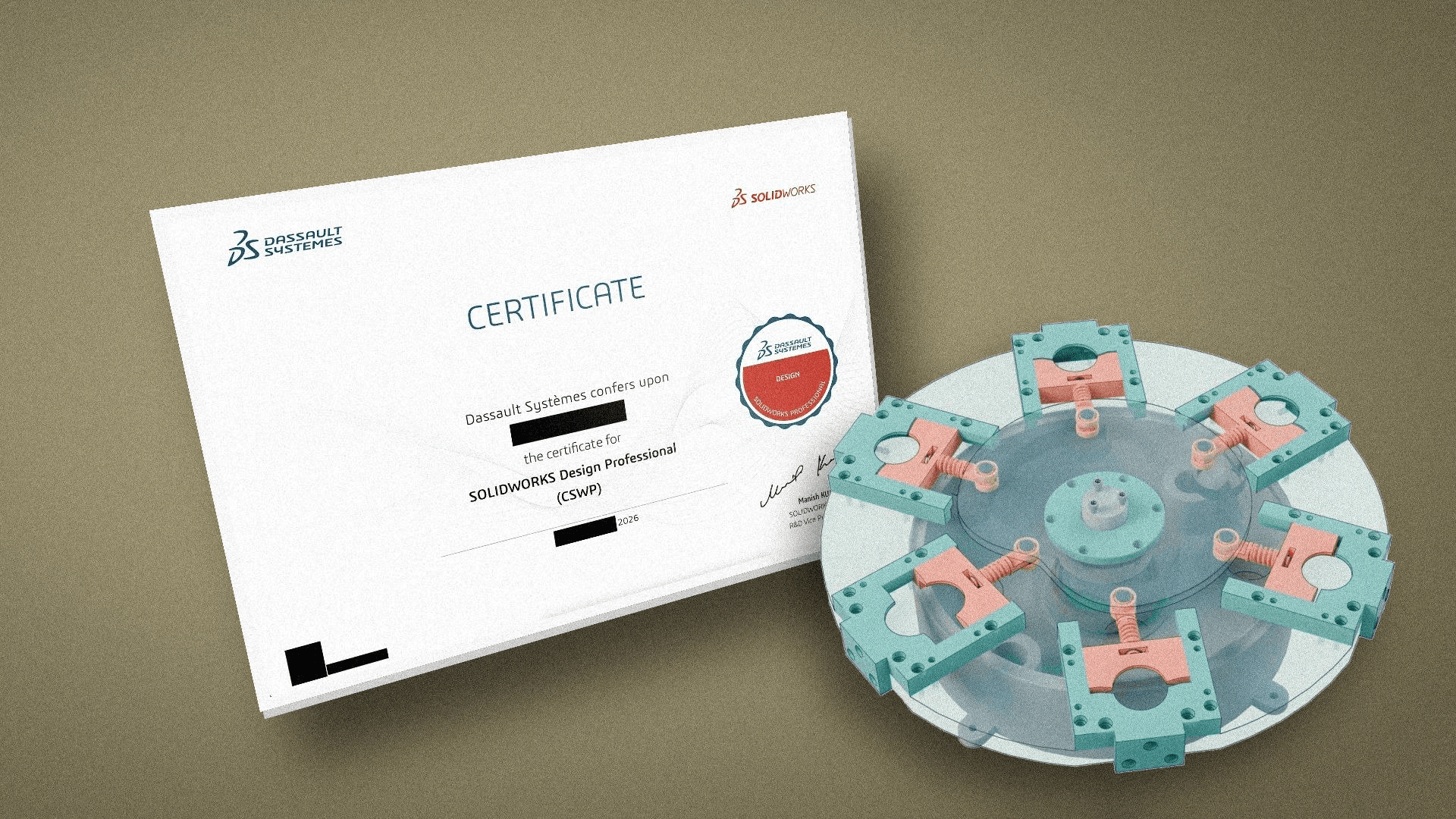
The Certified SOLIDWORKS Professional (CSWP) exam is a timed test of part modeling, part editing, and assembly construction. Our agent, powered by SGS-Mk2 and working in Quartz, passed all three segments in one three-hour sitting with no human guidance. In controlled experiments on similarly-styled problems, SGS-Mk2 cut per-problem costs by 46–87%.
QUARTZ FOR ENGINEERING TEAMS
Bring in a design with its feature history intact, describe the change you need, and let agents work on every affected part at once. Each proposal is built in the real assembly, so you can check fit and geometry side by side, then accept, revise, or reject it before it goes back to your CAD.
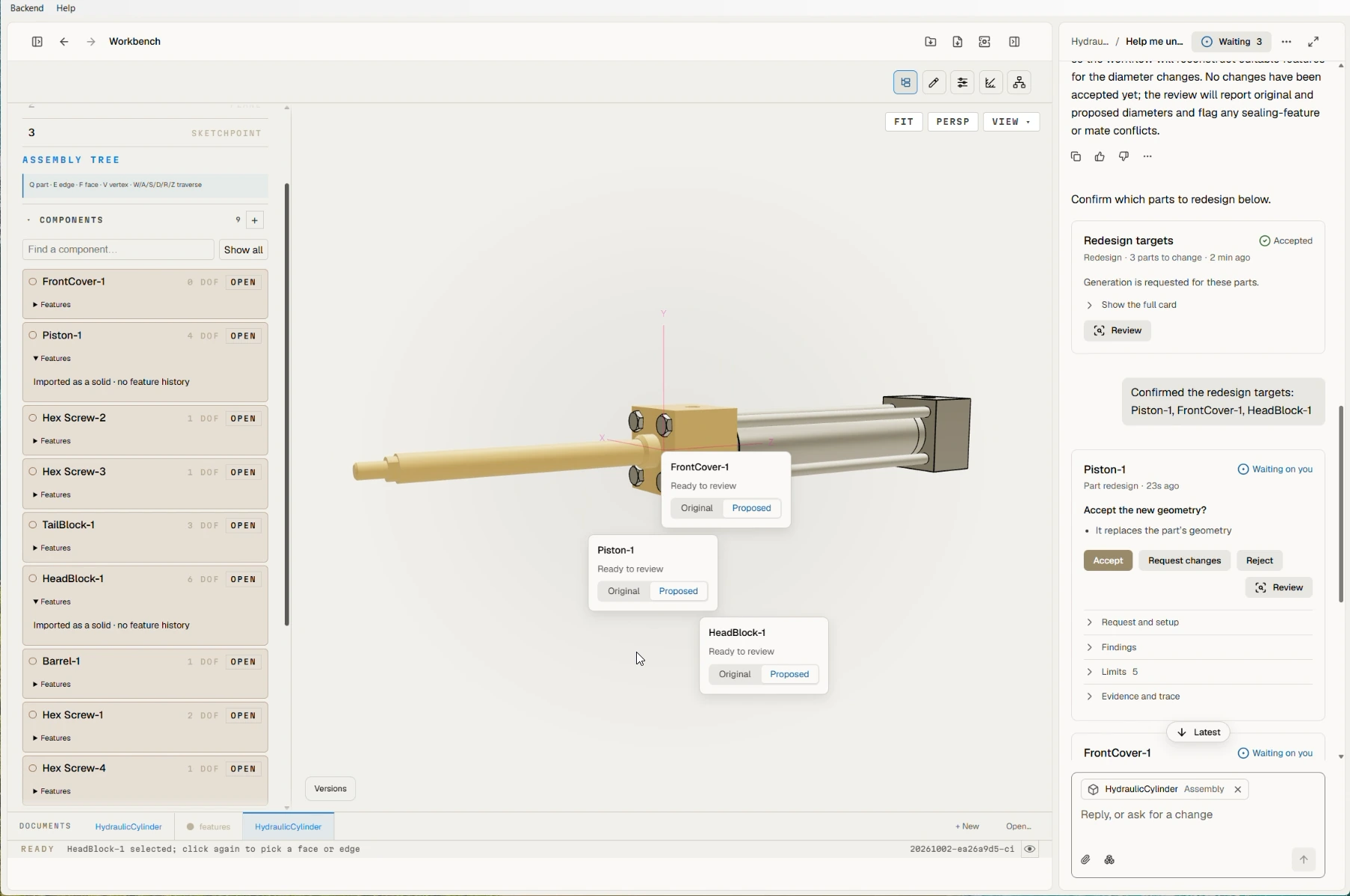
A change to one component can affect the rest of an assembly. Inspect the proposed geometry where it will be used, request revisions, and retain the design structure for subsequent work.
Bring analysis results, supplier specifications, and manufacturing constraints into the workflow. Agents propose changes in Quartz, and the checks relevant to your task determine whether those changes meet the requirement.
PARTS / ASSEMBLIES / EXISTING CAD
Create new parts, revise existing designs, and coordinate work across an assembly. Our interoperability layer moves designs between Quartz and supported proprietary CAD workflows with editable feature history.
SOLIDWORKS → QUARTZ → SOLIDWORKS
QUARTZ FOR PRODUCT TEAMS
Bring Quartz’s CAD capabilities into your own products and systems. Execute constructions and edits programmatically, run independent geometry workloads in parallel, and keep designs editable across supported native CAD paths.
01 / YOUR PRODUCT
Connect your application, agents, and domain data to Quartz. Inspect designs, execute proposed modifications, and return CAD that your users can continue editing.
02 / YOUR EXPERIENCE
Use Quartz as the foundation for an engineering experience under your own brand. We scope the interface, integrations, deployment, and distribution for your product.
03 / YOUR MODELS
Run model-generated constructions and edits, inspect the resulting geometry, and connect outcomes to your learner and chosen scoring system.
Quartz holds each design’s state and its full history on its side, so an agent can move through a design without rebuilding it. Two capabilities follow from that.
Quartz records a rollback point for each engine call. Move backward or forward within a session without replaying the construction, then branch from an earlier point while keeping the original branch reachable.
When an earlier feature changes, Quartz returns to that feature’s build point and rebuilds the features that follow it. The preceding geometry stays in place, so an agent can revise a design without starting the entire construction again.
The engine’s saved history preserves rollback points across reopening. This supports revisiting earlier CAD states and exploring different continuations. Session history is distinct from an RL harness’s transcript, policy version, and task state.
Your harness controls the model’s context and history compaction. We scope the geometry queries and observations it needs, including the handling of entity references after edits. Recovery from a worker or network interruption also requires durable storage and a matching action/observation record. Save cadence, fresh-worker restoration, and safe retries are verified for the chosen integration.
EXECUTION PERFORMANCE
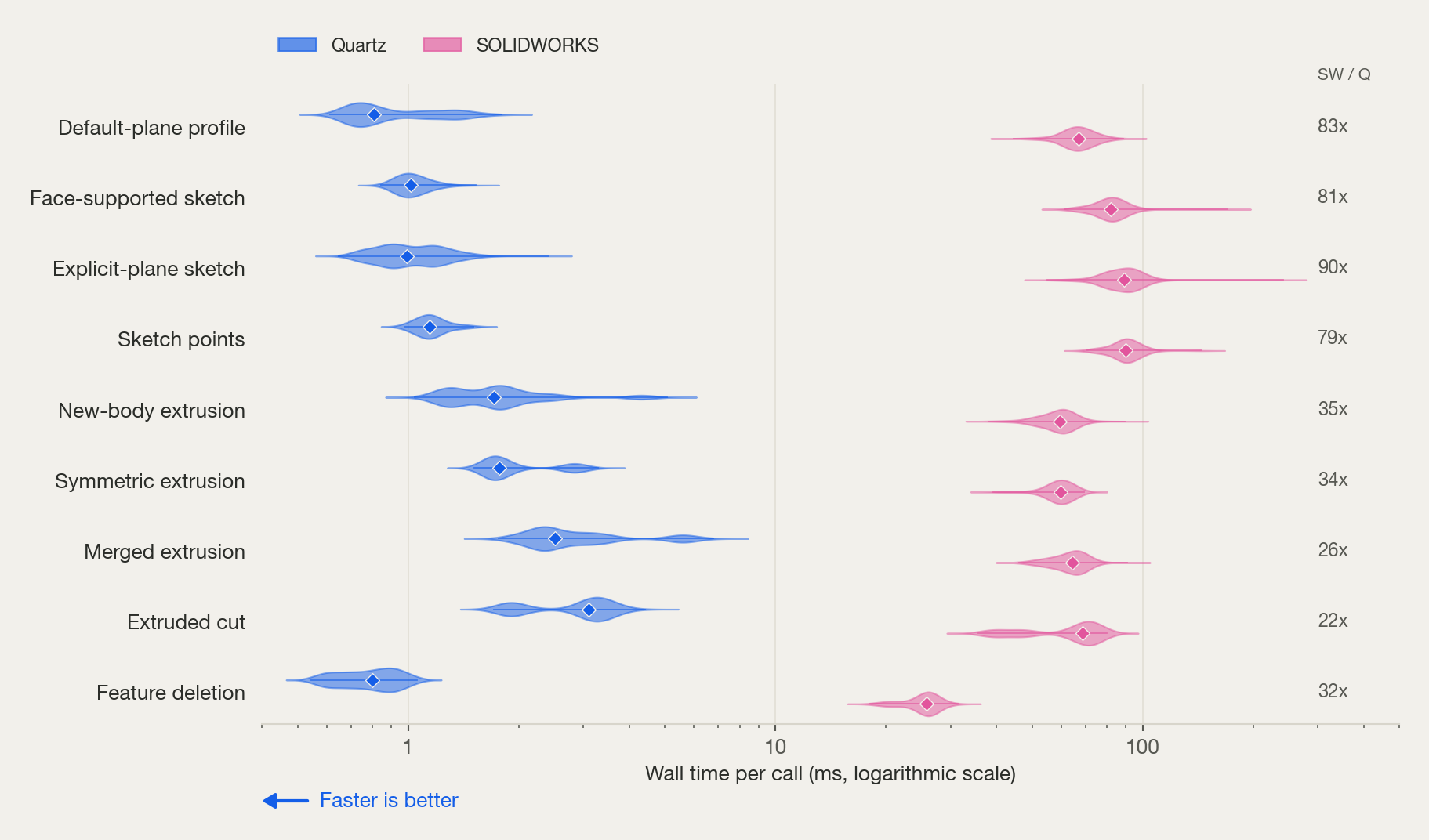
Fast geometry execution gives applications a shorter wait after an edit and training systems more capacity to evaluate candidates. We measure execution time alongside resource use and whether the resulting geometry is correct.
Each violin shows the distribution of measured call times. Wider areas contain more observations, and the diamond marks the median. Quartz completes the tested sketch and feature operations in less time across these distributions, reducing the wait between an agent’s instruction and the geometry it can inspect.
In the same small-part workload, Quartz uses less CPU work per call and a smaller resident CAD-process footprint. These measurements help size execution workers. The model, observations, and scorer need their own resource budgets.
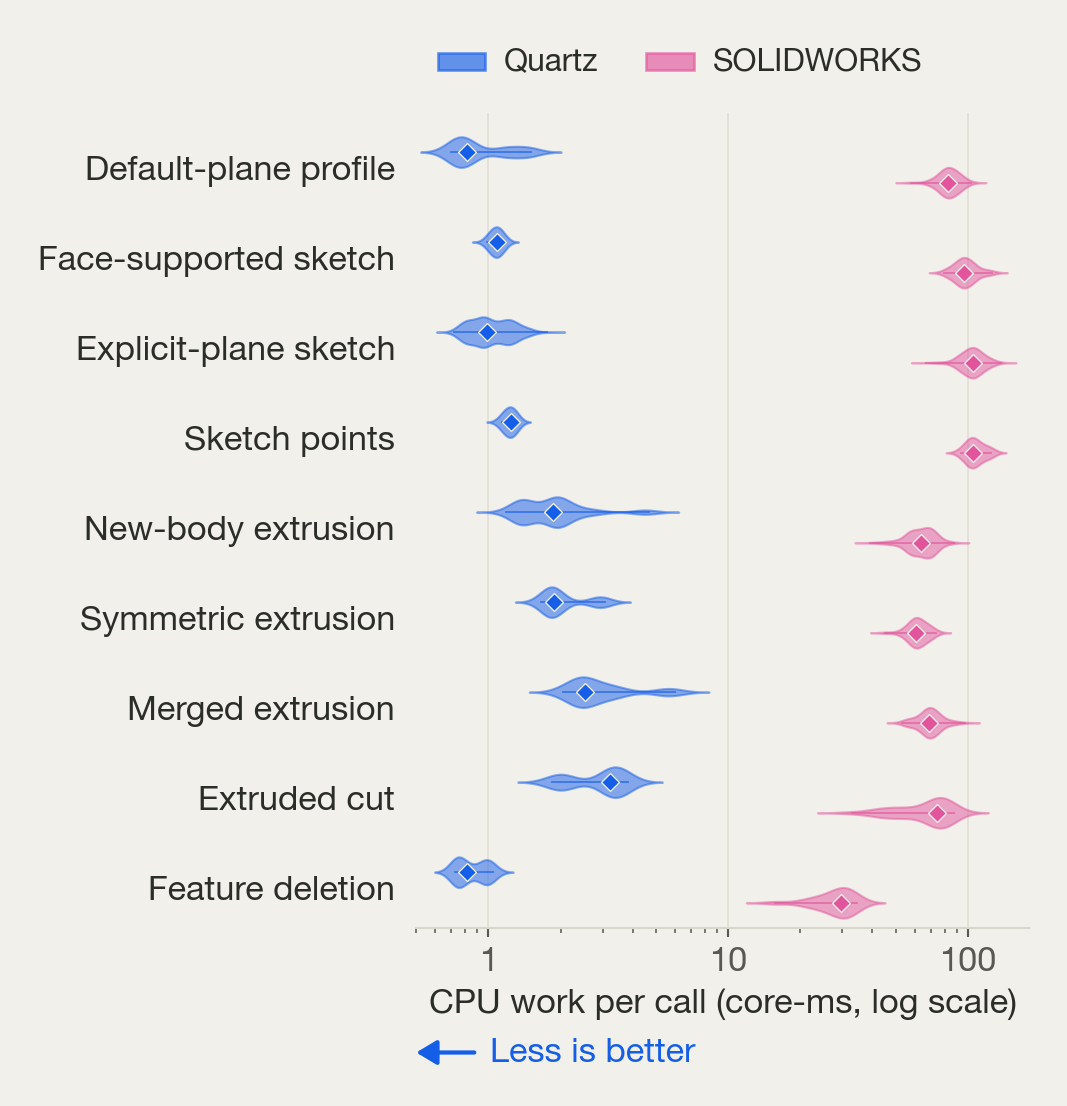
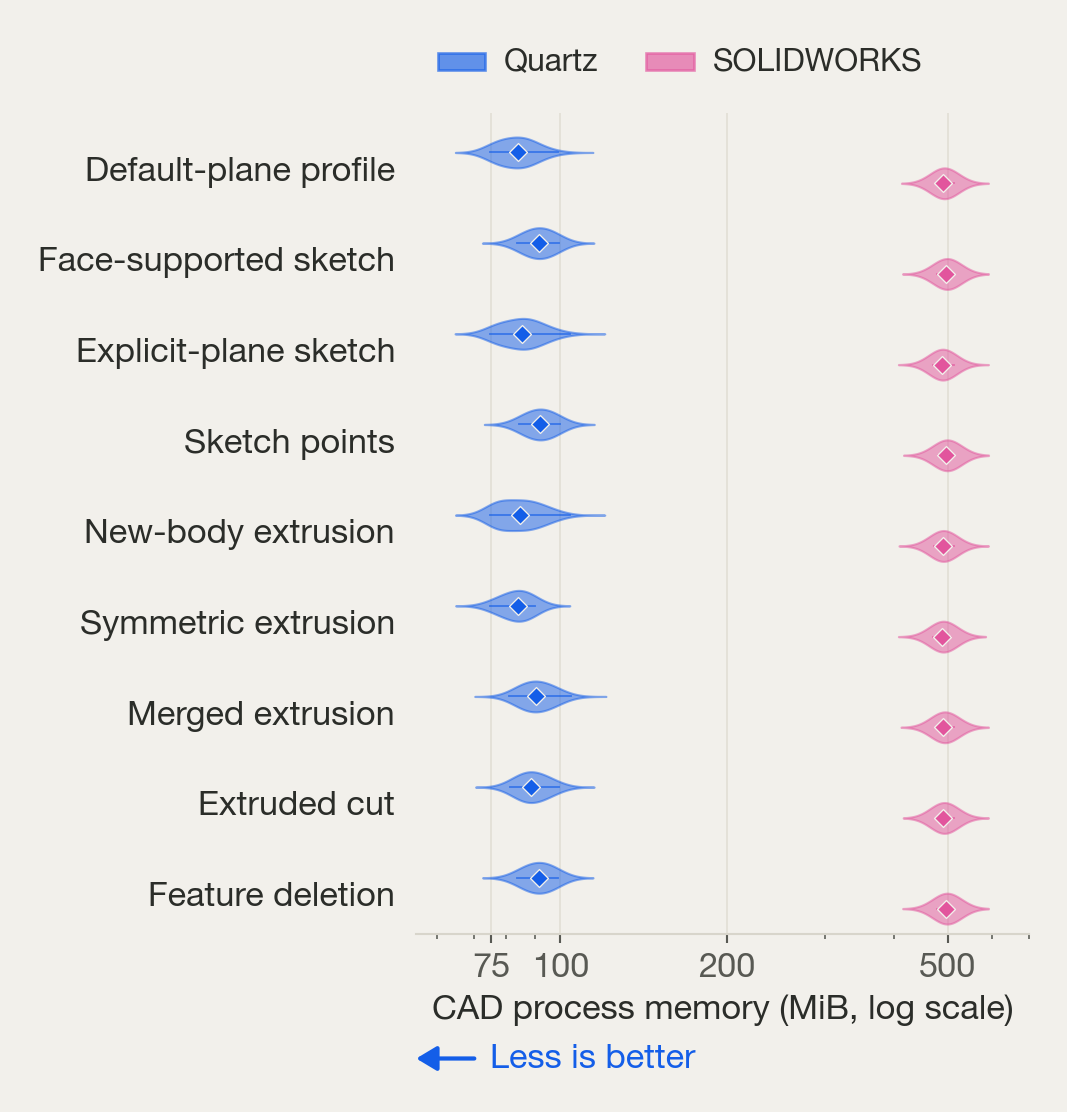
CPU includes backend and client work, grouped over ten calls to reduce counter quantization. RAM is the CAD process’s observed pre/post-call resident footprint, not peak host memory or total deployment RAM. Both axes are logarithmic.
The follow-up study runs the same constructions through one, two, four, and eight independent CAD processes. Quartz throughput increases 6.46× from one to eight processes while CPU and memory use rise. SOLIDWORKS throughput falls in this tested desktop COM setup.
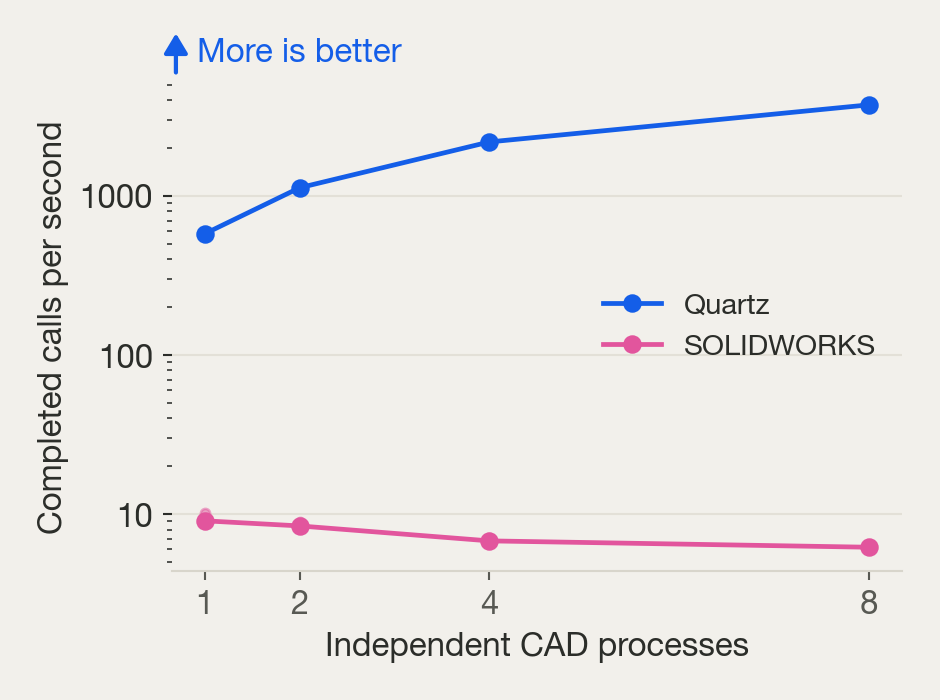
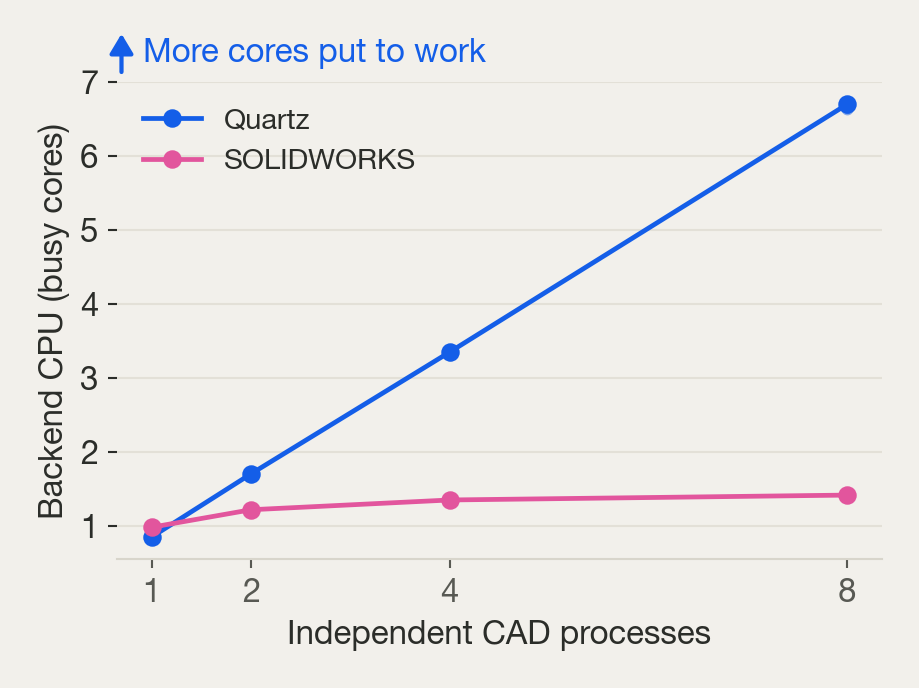
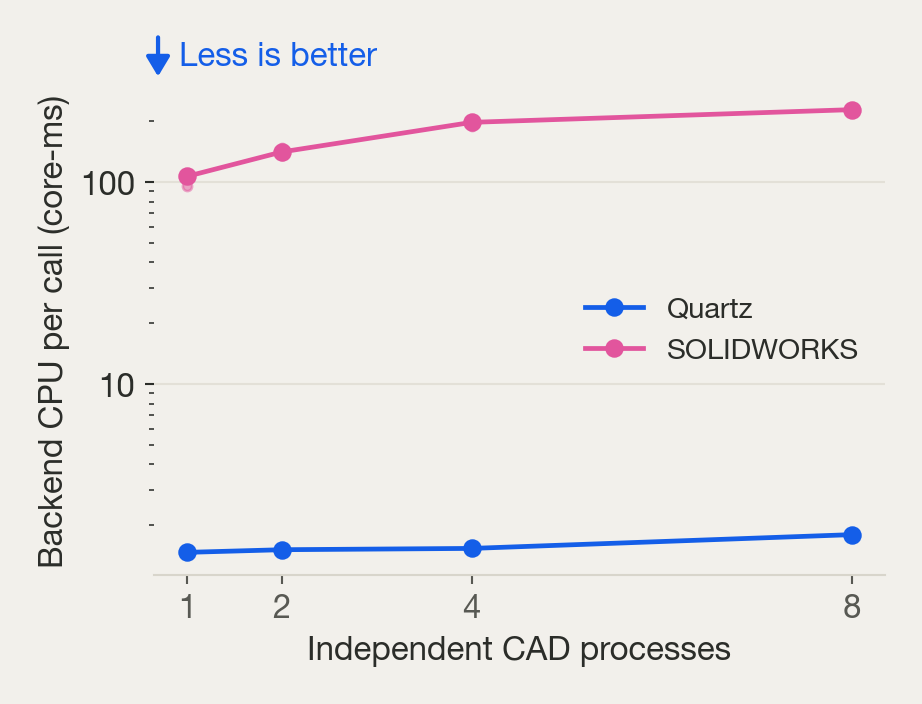
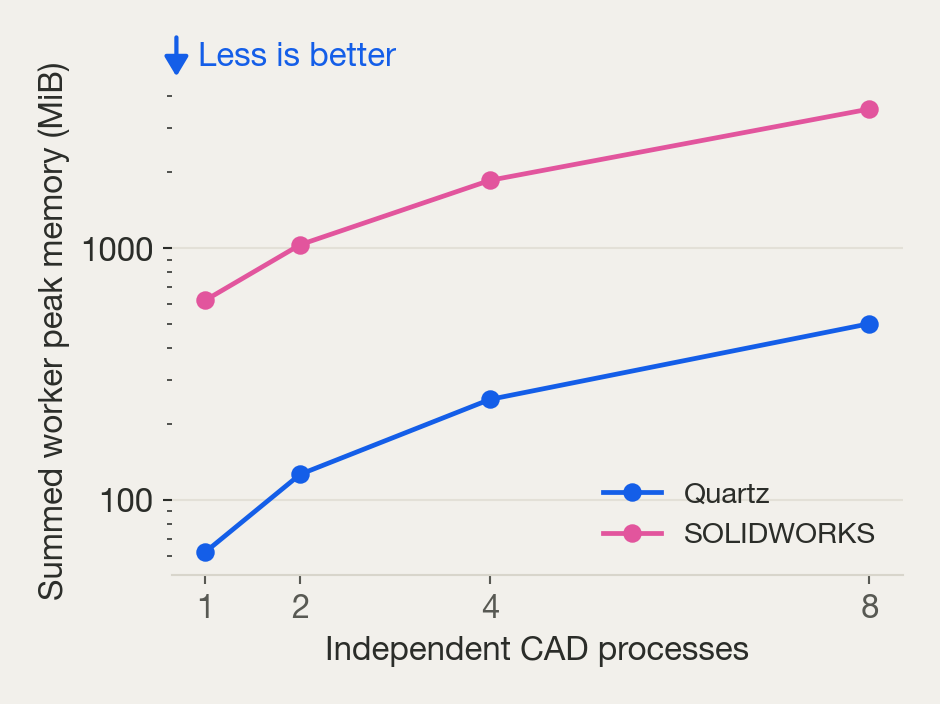
Repeated blocks at each concurrency level, with equal repeat counts in the paired comparison. Throughput includes model reset and final geometry checks. Summed worker peak RSS is an upper bound that can double-count shared pages and excludes the WSL VM and clients. This is a host-and-workload result, not a universal SOLIDWORKS scaling limit.
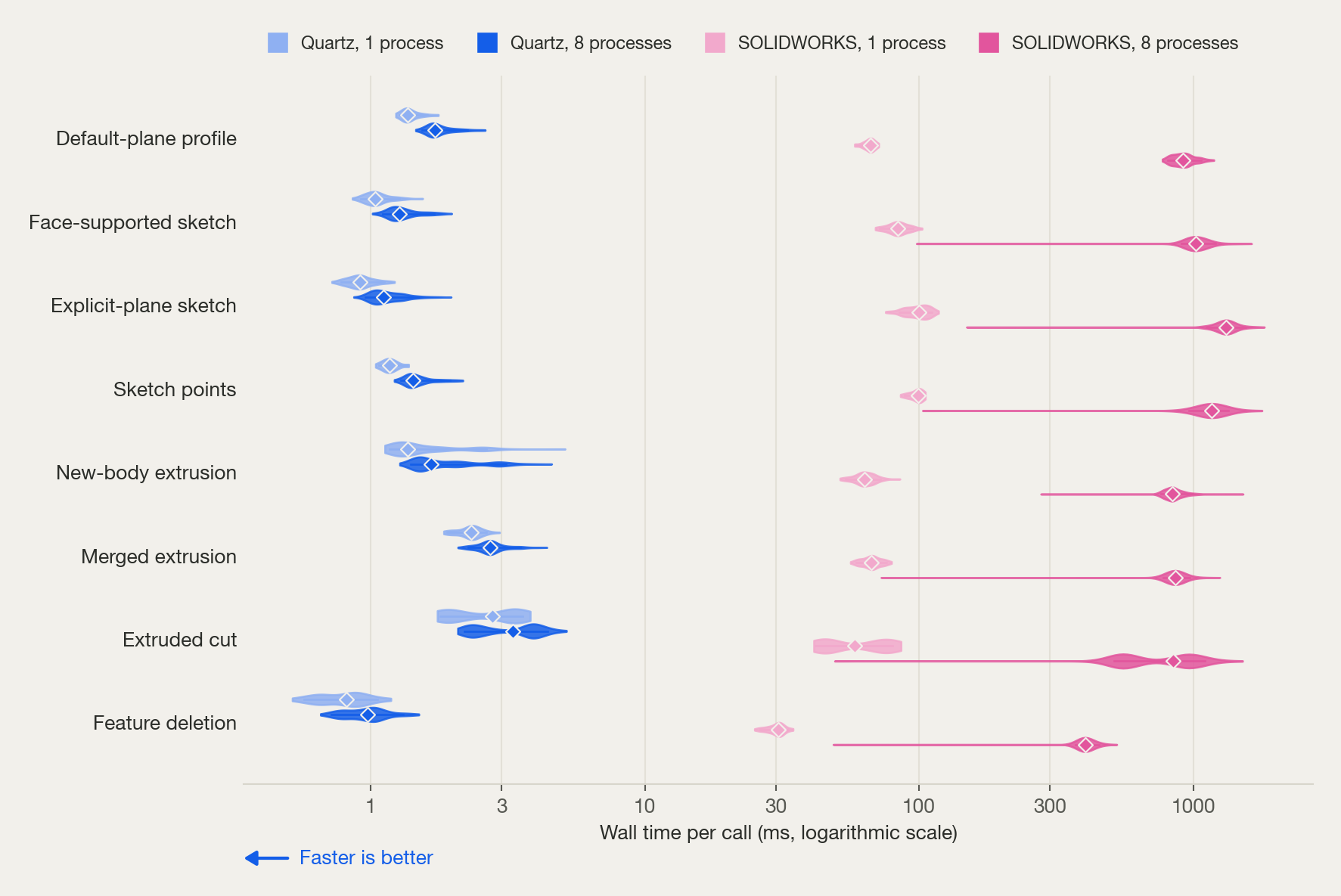
Measurements compare SOLIDWORKS 2026, driven through its COM API, with Quartz running under Linux (WSL2) on the same Windows 11 workstation (Intel Core i7, 32 GB). Both systems receive the same construction steps, and runs alternate between the two systems in blocks so that background load and machine state affect both alike. Quartz time is the client’s wall time for one HTTP call to a local server, request and response included. SOLIDWORKS time covers the COM calls that one Quartz call maps to. Per-call timings exclude startup, reset, model generation, rendering, and final validation. The SOLIDWORKS adapter validates sketch construction inside its call boundary, so that check counts toward its time.
The separate cloud-fleet and paired peak-memory studies use different workloads and resource boundaries and are not pooled with these charts. The cloud-fleet study runs Quartz in sandboxed Linux containers, one environment per container with 1 vCPU and 0.5 GiB requested, and measures how throughput grows as environments are added. The paired peak-memory study records each system’s peak memory while building whole parts: a median of 120 MB per part for Quartz and 662 MB for SOLIDWORKS. End-to-end training additionally includes policy generation, observations, scoring, and learner updates, which need their own compute and memory budgets.
FOR RL RESEARCHERS
Short answers to the questions we hear most from teams training CAD agents.
01 / STEP TIME
Milliseconds. On the same constructions, a typical Quartz call takes about 1–3 ms, where SOLIDWORKS driven through its API takes about 25–90 ms. Step time varies by operation, as the distributions above show.
02 / COMPUTE AND SCALING
Quartz runs as a lightweight Linux process, with no GPU or license server, and uses about a fifth of the memory of a desktop CAD process. Throughput grows with the number of parallel environments, to hundreds of steps per second on a cloud fleet.
03 / CONTEXT
Your harness owns the model’s context and decides how to compact it. Quartz holds the design state and its full history on its side, so that history does not have to live in the model’s context. We scope the geometry queries and observations your agent needs to read the current design.
04 / RESET
Yes. Every engine call records a rollback point, and a session can jump to any of them without replaying the construction. You can branch from an earlier point and keep the original reachable.
05 / REWARD
Bring your own scoring. Quartz returns the resulting geometry and design state after each step, so your scorer can evaluate the candidate however your task requires.
06 / SOLIDWORKS COVERAGE
Most of it. In our tests, 83% of SOLIDWORKS parts rebuilt in Quartz with every feature editable and the exact shape, and 98% kept the exact shape. Designs can also go back to SOLIDWORKS with their features.
07 / FAILURES
Quartz saves a session’s state with its history and rollback points, so an interrupted episode can pick up where it left off. Durable storage and a record of the agent’s actions are part of each integration we build.
WORK WITH US
Bring a representative design task or geometry workload. We’ll walk through the relevant capabilities and agree on what a useful evaluation should demonstrate.
Start with a part or assembly, the change you need to make, and the CAD tools and review process your team uses. Evaluate the proposed changes and the editable design that comes back.
Start with representative constructions, required CAD paths, target concurrency, and your integration. We’ll work through execution, resources, state handling, hosting, analytics, and any scoring requirements.
We establish the execution interface and its outputs, the operation variants and CAD versions you need, the CPU, memory, and software dependencies, concurrency and assembly behavior, saved-state restoration and failure handling, and the deployment and support scope you choose. For training, we also define observations, scoring, and the boundary between Quartz and your harness. Embedding and white-label delivery are scoped separately from internal training access.