
Quartz: CAD Software Built for Machine Intelligence

Very few teams in the world are actually training AI models to do CAD. We’re one of them. It’s hard, and the reason it’s hard isn’t the one most people expect.
When we first set out to train SGS, our line of generative CAD models, we hopped from mires to sandtraps. This is because these models have to learn CAD by doing it. And like in any engineering discipline, they have to execute not once but millions of times, building parts, resolving mates, diagnosing errors, and trying again. Game-playing AIs got good by launching millions of sessions and playing against themselves. Coding models learn by running their programs in sandboxes billions of times over, and math models improve by having every proof checked by a verifier like Lean. Each needed an environment that could run a model’s attempt and score it, quickly and at scale.
For CAD, that practice field didn’t exist.
No CAD software was built to be used end-to-end by a machine, thousands of times, all at once. And to top it off, CAD demands numerical rigor in a way none of these other technologies face. The cost of an error is high because the physical world lags behind the digital world. An engineer can easily burn through weeks of production runway and thousands of dollars when a housing unit doesn’t seat, a bore is in the wrong location, or any one part has a misaligned internal corner fillet.
So, we built our own CAD harness. And in the process, we found that you can’t train a CAD model separately from the CAD environment it works in. The two have to be built together. That environment, the sandbox where our agents train and operate, is now Quartz, our singular product. It is CAD built for agents, steered by engineers.
This post explains why we had to build our own geometry execution system, and how that system became Quartz.
Native CAD doesn’t work
SGS learns in two stages. In pretraining, it learns from a large collection of engineering designs. In reinforcement learning (RL), it writes constructions and is rewarded for the geometry it produces. Both stages need real engineering data, and most of the world’s engineering designs live inside proprietary CAD suites like SOLIDWORKS, Siemens NX, Autodesk Inventor, CATIA, and a few others.
A CAD file in this software can be confusing to train on because it’s somewhere between being a math proof, a physics puzzle, and a compiled computer program. It’s actually much easier to view these files as recipes: a sequence of sketches, extrudes, fillets, mates and patterns, with each step building on the last. To learn CAD, a model has to read millions of those recipes, then cook its own versions over and over to see how they turn out. For pretraining, we needed to turn these recipes into training programs. For RL, we needed to run the programs our models wrote, over and over.
The first obstacle: CAD software is built for one person at a desk. The obvious first thing to try when you want to run millions of designs is to just run the CAD software itself. It can do every operation we need, it just can’t do them at the speed or scale training demands. We’ll use SOLIDWORKS to explain why. On our own machines, one SOLIDWORKS session takes more than ten seconds just to start, and a machine handles a couple dozen parts a minute at best. For model training, we needed roughly 100 times that throughput.
Running more copies of SOLIDWORKS doesn’t bridge the gap. For one, it’s finicky. We had to write a separate program whose only job was to click away pop-up dialogs. And with more than 8 copies on a machine, jobs start failing. At 16, nearly half of all jobs failed, which killed any of the gains from adding parallel work. Scaling machines wouldn’t work either, because training needs thousands of sessions running at once. This approach is a non-starter.
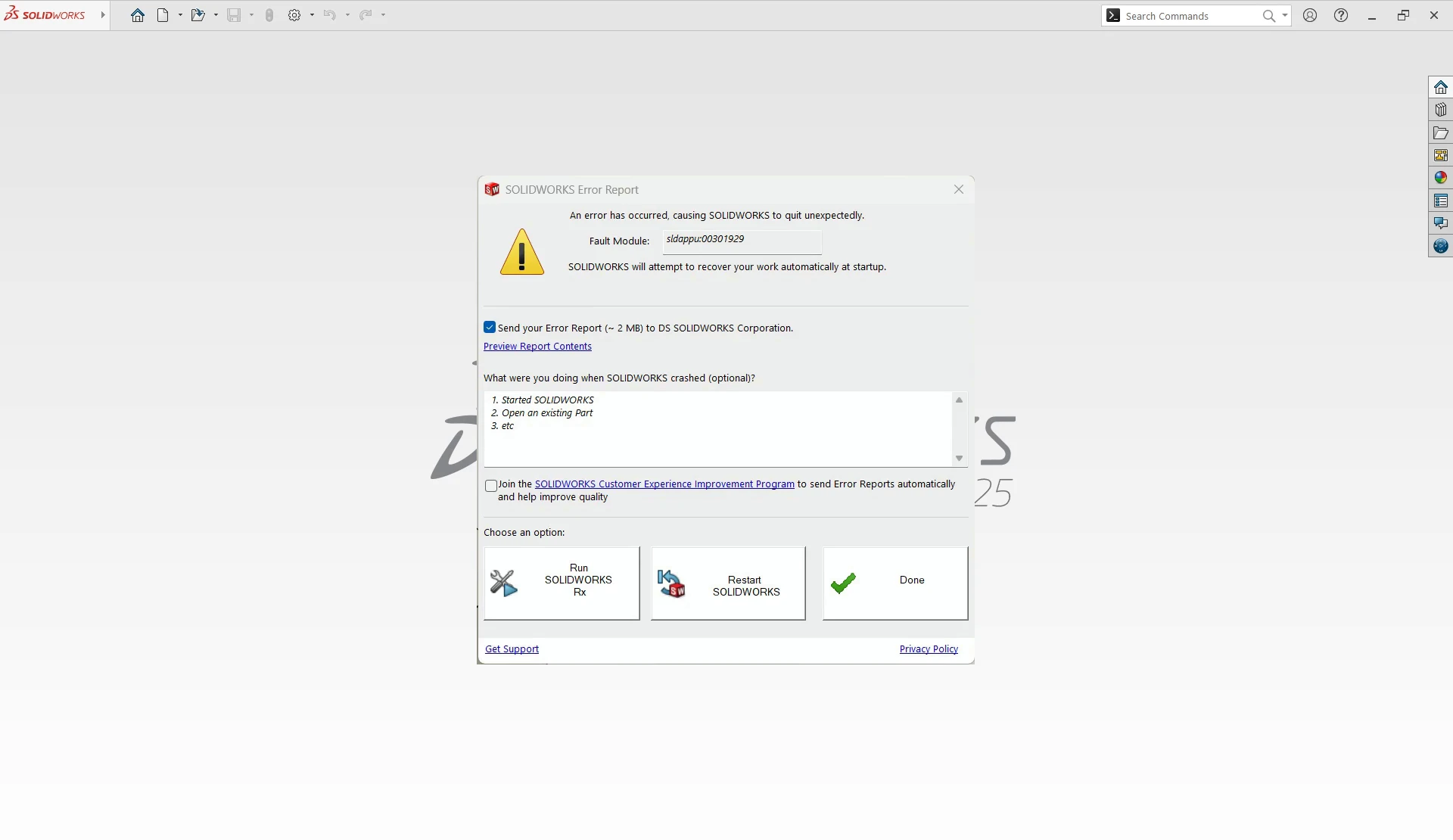
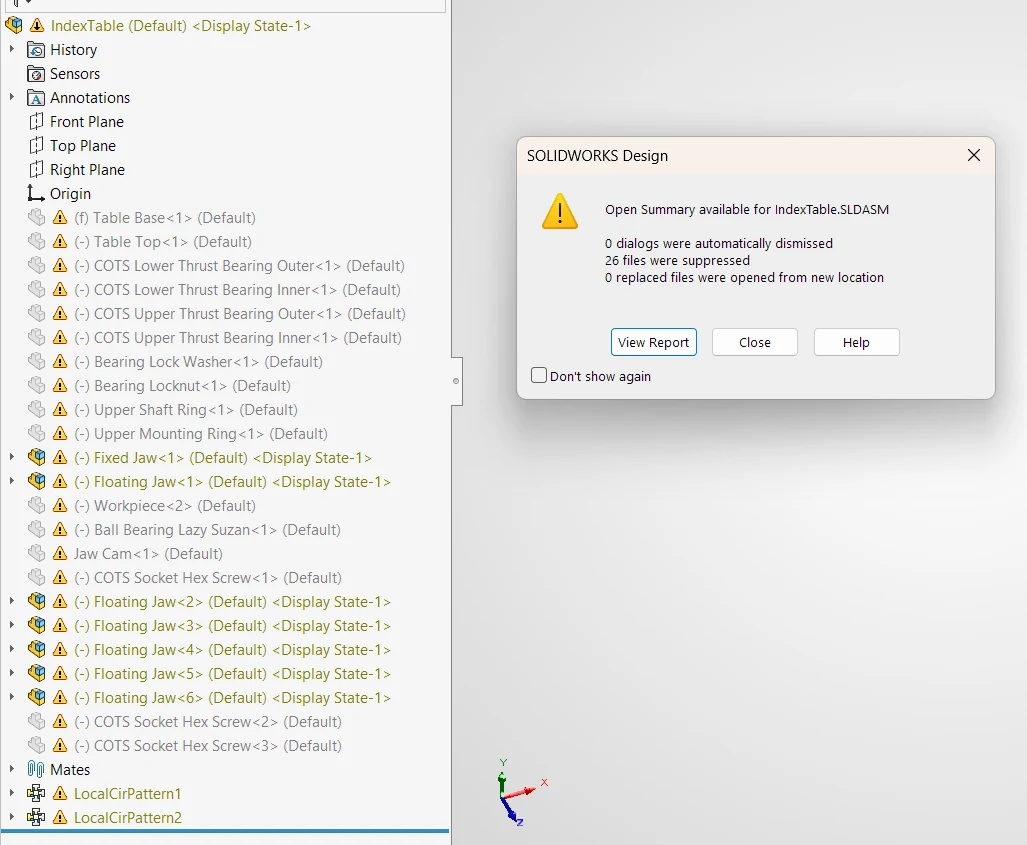
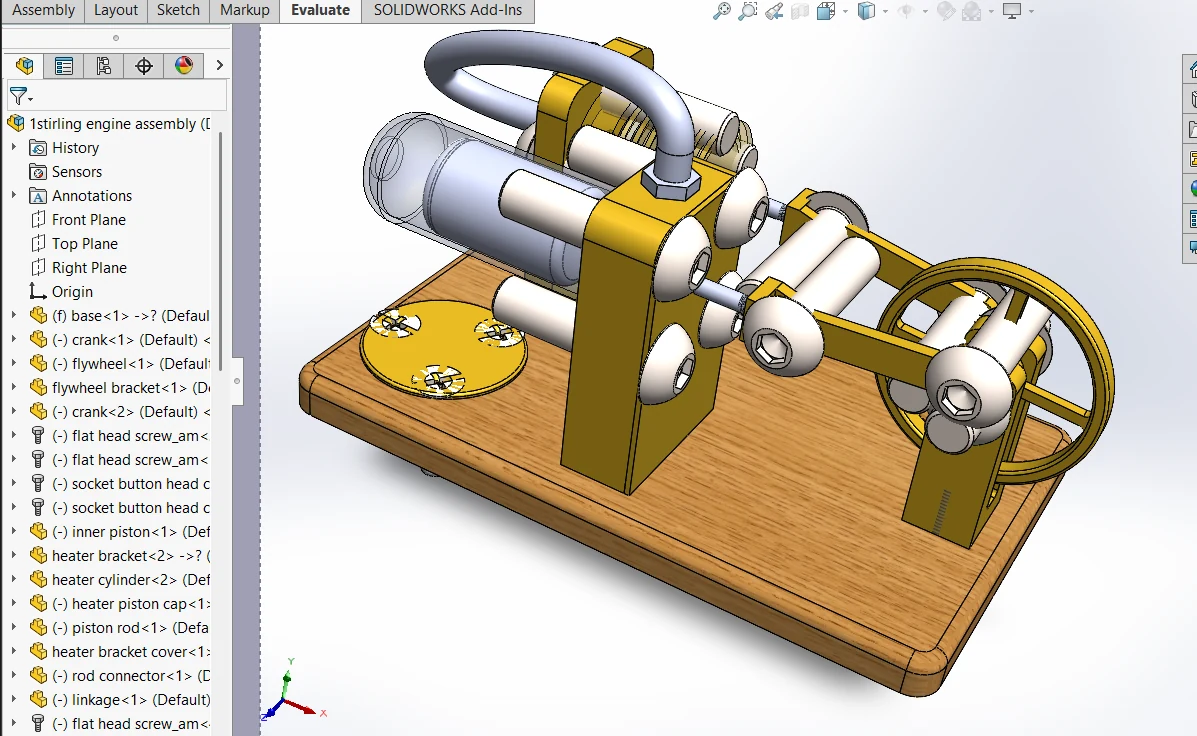
Worse, desktop CAD fails silently too. Converting hundreds of thousands of real-world assemblies surfaced a long tail of quiet failures. An assembly references its parts by file paths on its author’s machine, so anywhere else SOLIDWORKS may suppress parts or quietly load a same-named part from a different project (Figure 4). Standard fasteners are regenerated every time a file opens, and can come back missing or at the wrong size (Figure 5). A file saved in a newer release can open in an older one with its mates emptied. None of these raise an error. Each one had to be detected and engineered around before a single design could be trusted as training data.
Open source kernels are not robust
Once we’d eliminated our first approach for every major desktop CAD suite, the natural alternative was to translate designs into a free and open format. Should be easy, right?
The plan certainly seemed straightforward. We would export each native feature tree, convert it into a common open representation, and rebuild it with OpenCascade (OCC), the most widely used open-source geometry kernel. The converted construction data would feed pretraining. For RL, we would run the same rebuild pipeline on Linux workers we controlled, with no licenses, no Windows and full control over how the work was parallelized.
The second obstacle: open source frameworks break engineering-critical features. Speed was still a concern, but robustness turned out to be the bigger problem. Open source kernels broke exactly where it mattered. The details that are most important for turning a block into a manufacturable part, like fillets, shells and drafts, were where the rebuilds failed most often. Far worse, some failures were silent: the software reported success and handed back broken geometry.
Some features are missing altogether. OpenCascade has no sheet-metal features, no flanges, bends, hems, closed corners or reliefs, and no flat pattern with a K-factor. CadQuery and the raw OCP bindings add nothing beyond plain solids. FreeCAD’s community SheetMetal add-on builds some of these on top of OpenCascade (base walls, edge flanges, folds, unfolding with a K-factor and some corner reliefs), but that still leaves much of what real sheet-metal parts are made of without an open-source equivalent.
These limitations leave two bad options. If we had thrown out the parts that failed, the model would only ever learn simple shapes. Had we kept them, the model would have learned from wrong geometry. Either way, we would have ended up with a model that understood a narrower, less accurate picture of real engineering than the one we had eventually obtained.
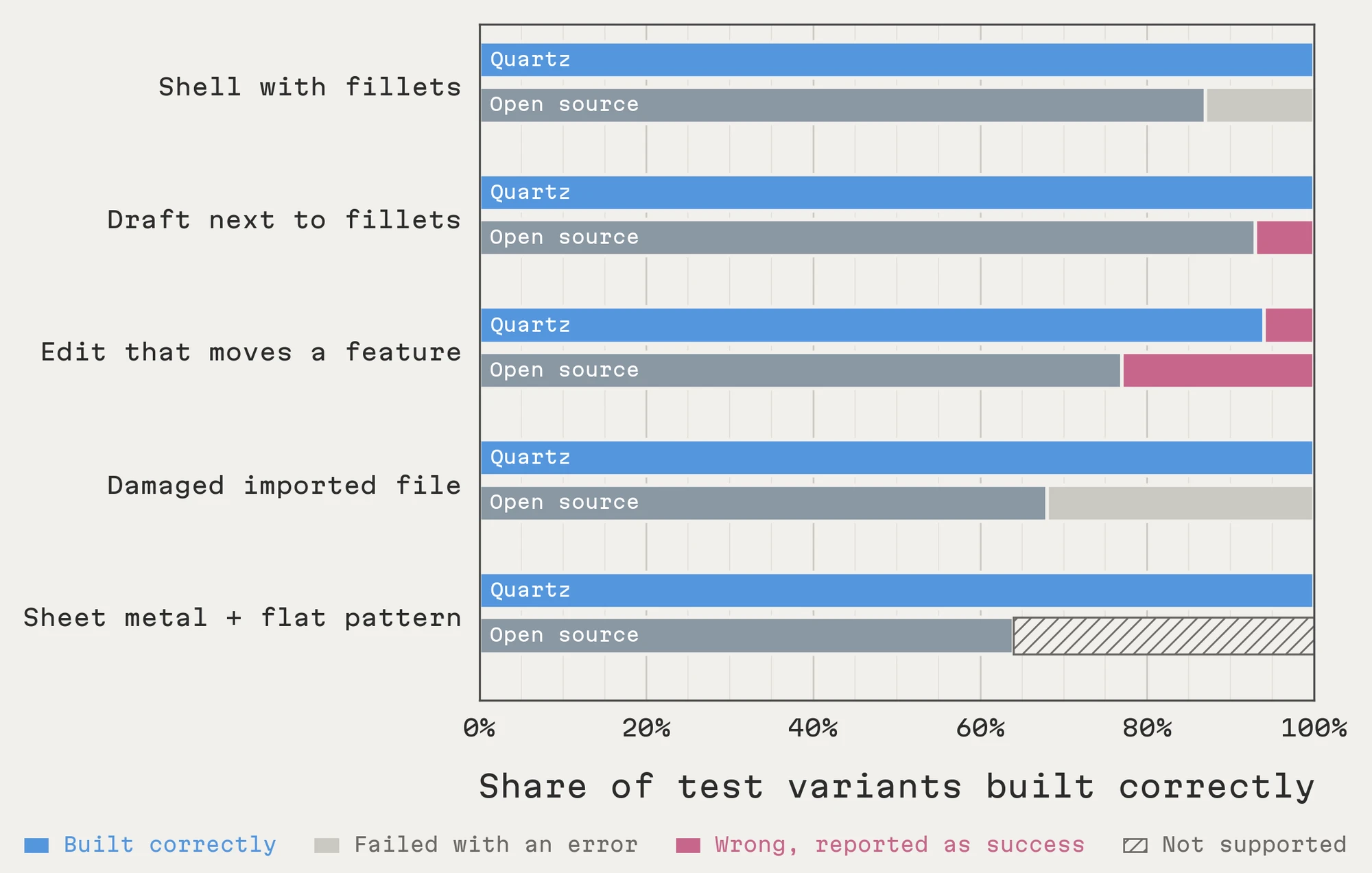
Today, a capable AI agent could probably repair some of these failed rebuilds by hand. But an agent working through each object one at a time adds inference cost, latency, and a further step to verify the agent’s own fixes. That is reasonable for one design, but fully unworkable at training scale.
What we actually needed was a representation and an execution environment that kept the complexity of native CAD intact, while building and verifying geometry fast enough for training at scale. Nothing available did both, so we built one.
Enter Quartz
Quartz is CAD built from the ground up to be run by machines. At its core is a proven commercial geometry kernel, the same class of industrial-strength engine that serious CAD depends on, so fillets, blends, and all of the other complex geometric operations that open-source kernels lacked come out right. Everything above and around the kernel is ours: how designs are represented, how they translate to and from other tools, and how thousands of them are built and checked at the same time. Making that work well took an immense amount of engineering. A Quartz part records its units, an ordered list of parametric operations across dozens of feature types (extrudes, revolves, sweeps, lofts, patterns, fillets, chamfers, shells, holes, drafts, sheet metal, reference geometry), its 2D and 3D sketches with their constraints, and attributes on its faces. Assemblies further layer components, instances, and mates on top.
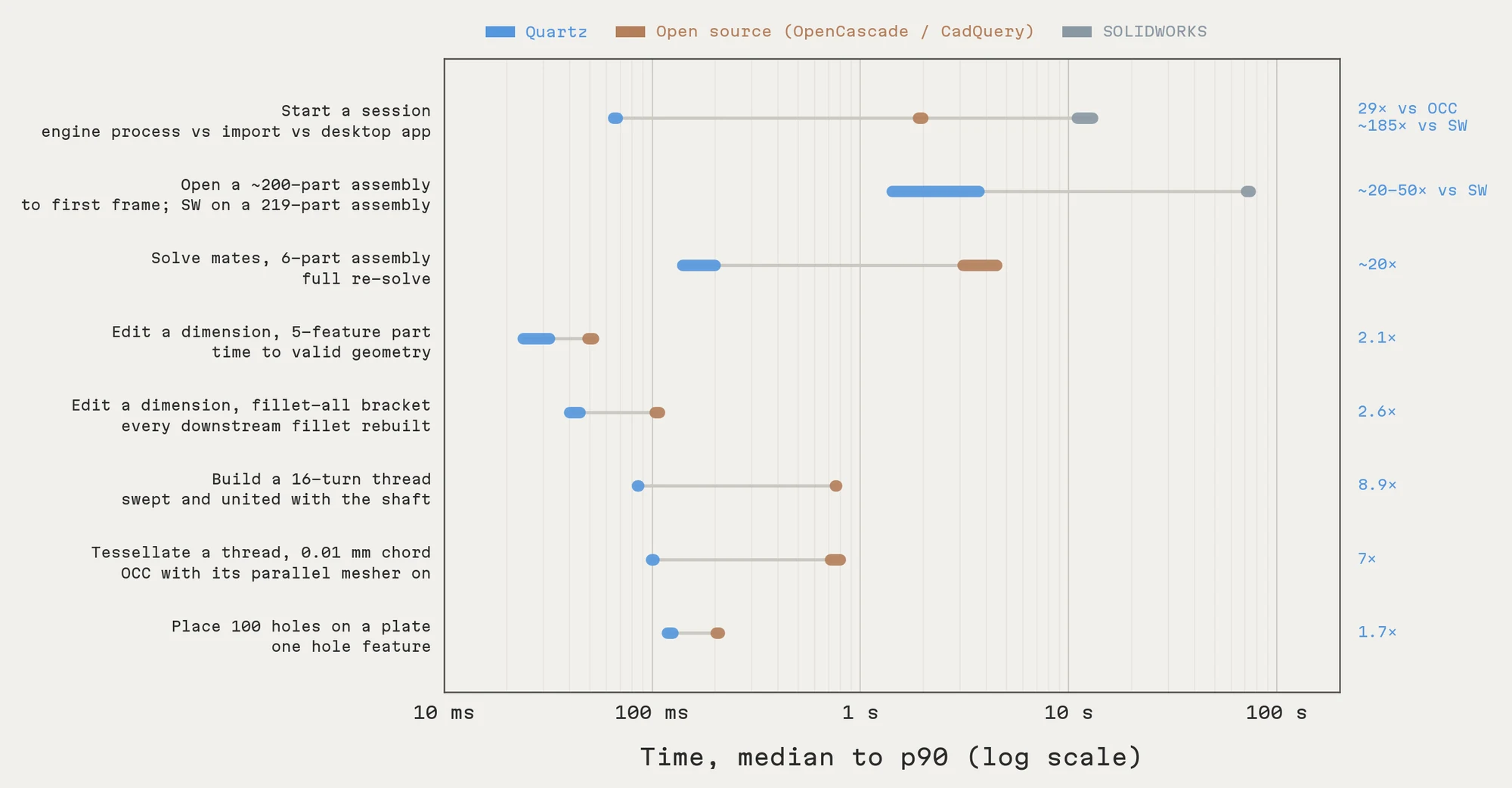
The difference is night and day:
- Quartz starts in under 100 milliseconds, where a SOLIDWORKS session takes more than 10 seconds: roughly 200× faster.
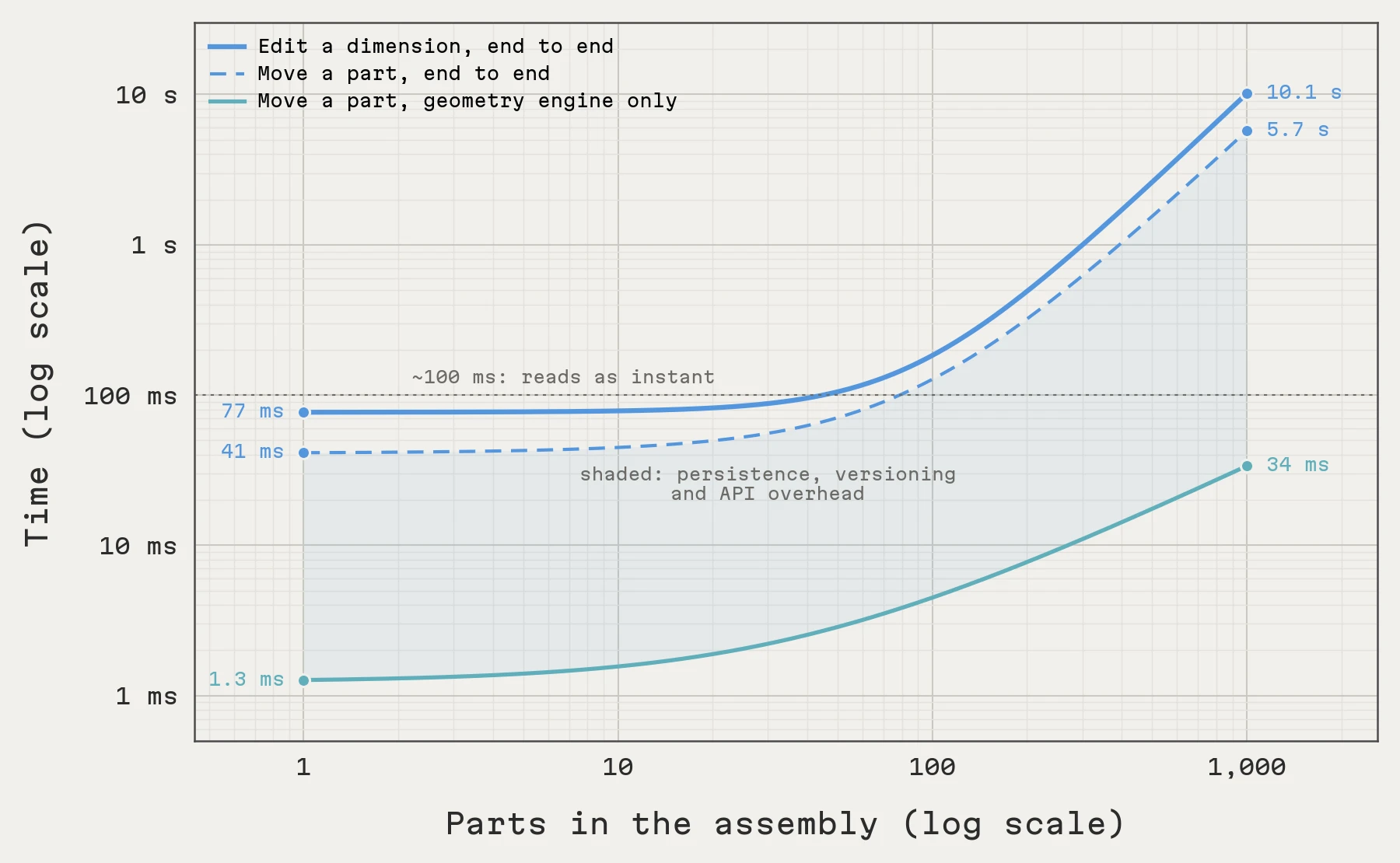
- It rebuilds a part in tens of milliseconds after a change, orders of magnitude faster than SOLIDWORKS part-for-part (Figure 2).
- It scales to thousands of sessions side-by-side, where SOLIDWORKS tops out around 8 per machine.
- And it turns around a batch of 1,000 parts in minutes, running in parallel with no licenses, where SOLIDWORKS needs hours of licensed machine time.
These pieces together unlock both SGS training stages. For pretraining, native designs arrive with their complex geometry intact, including the heavily filleted, multi-feature parts that were previously dropped. For RL, a Quartz engine starts quickly and rebuilds a part after an upstream dimension change in tens of milliseconds. And to top it off, we can prepare fresh training data in next to no time. Our data pipeline processes on the order of 1,000 assemblies per minute across a few thousand cloud containers, so a training step no longer waits on a CAD application.
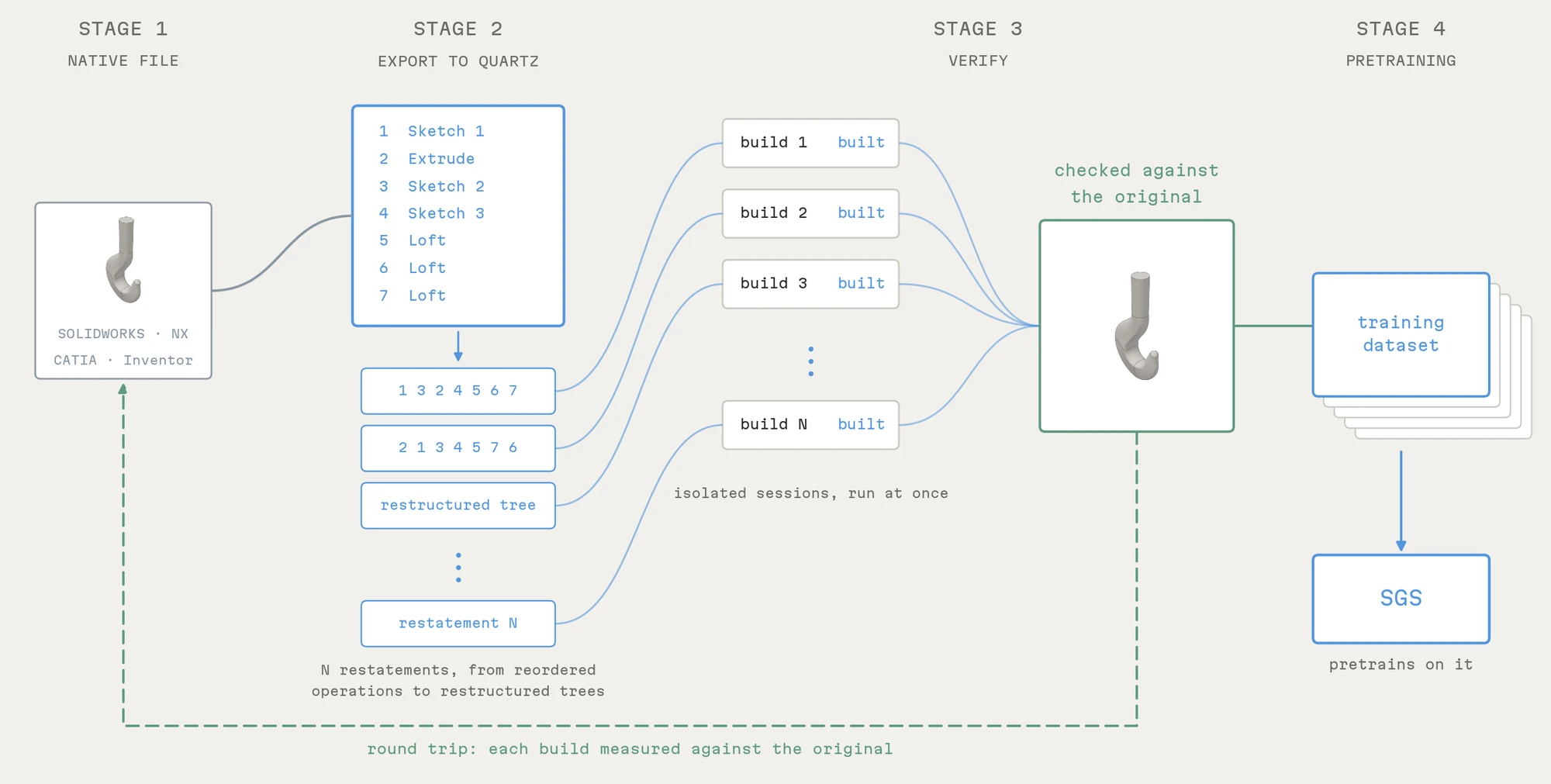
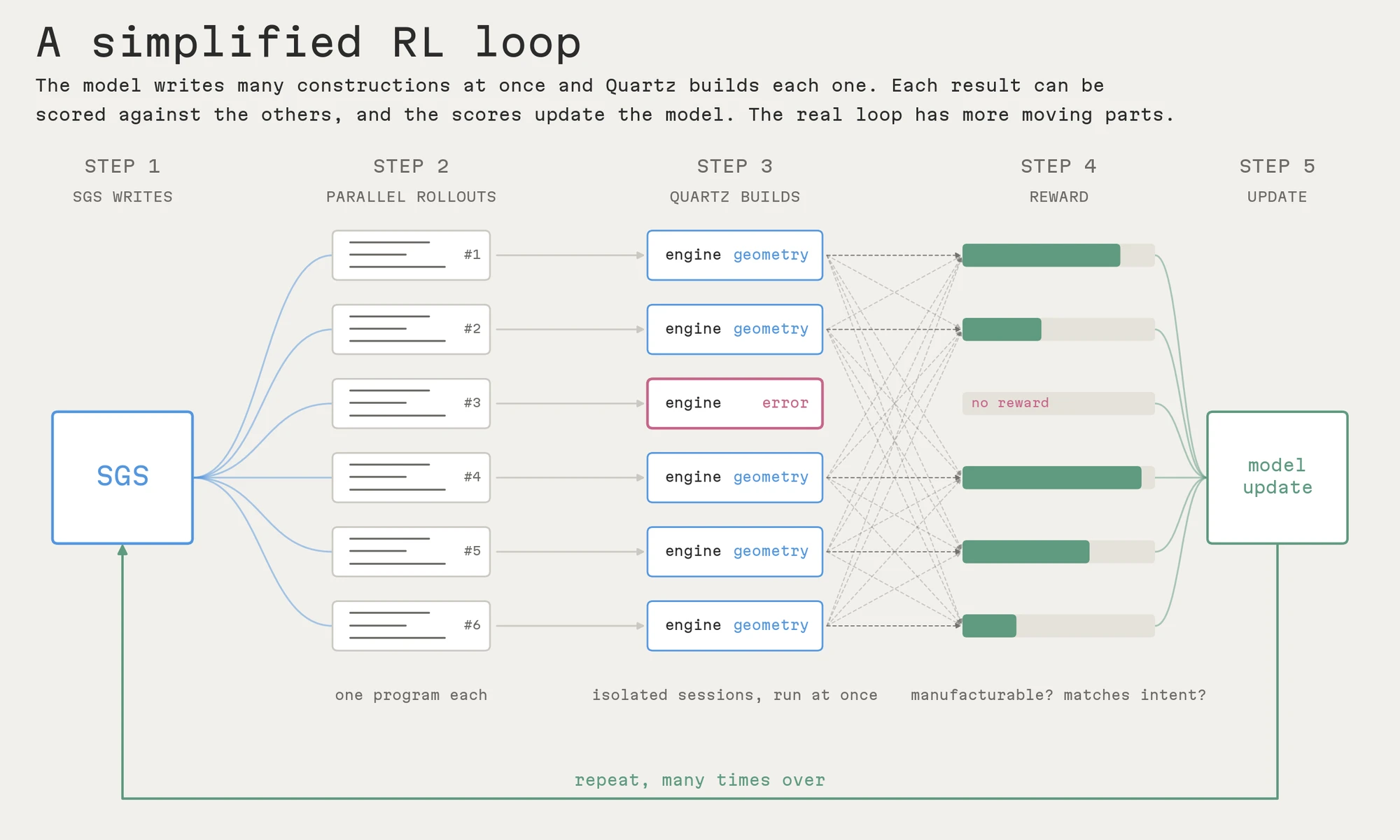
In brief, Quartz is what made closing the generative CAD training loop possible. It gave us the construction throughput the problem demanded, in a comprehensive and reliable engine that we could control and tune to our needs. And while we built it as a training environment, it didn’t stay one for long.
From an internal tool to a CAD product
The speed and robustness that RL demanded are also what an engineer notices first. That is what an engineer notices in CAD today, but it matters far more once machine intelligence is operating the software: agents work 10 to 100 times faster than a human engineer, across far more sessions in parallel. Other CAD software simply wasn’t built for this, and won’t scale to it. A part that rebuilds in tens of milliseconds after a dimension change, with no session to start, changes how it feels to edit a model, and an engine built to run many constructions at once is just as good at running many edits at once. To turn the training environment into a product, we added the interactive layer: a web app with agent chat, a 3D viewer that selects faces, edges and vertices on dense assemblies, a sketch editor, assemblies with mates you can drag live, exploded views, drawings with GD&T, FEA and CFD studies, and parallel batches of design agents.
On an assembly of a couple hundred parts and over a million triangles, Quartz draws the first frame in a few seconds and reopens it in under a second. Changing one part’s dimension rebuilds the part and updates the assembly in under half a second. Re-solving the mates of a small assembly takes a fraction of a second, about 20× faster than the open-source equivalent, and each step of dragging a part against its mates takes about a millisecond.
The same assembly is a good test for parallel work. In the opening sequence, an agent redesigns several parts at once. Each worker gets a private copy of the design with its own CAD session. Dependencies are explicit, so if a part that others depend on fails, its dependents stop and independent parts carry on. Changes come back as candidates. Two candidates that change the same thing can’t be combined, and once the engineer accepts one, the others are revalidated against it rather than merged silently. The engineer reviews the result in the assembly and keeps or rejects each change.
None of this is a separate feature added on top. It falls out of the architecture we built for training: isolated and concurrent construction on a robust kernel.
Working with SOLIDWORKS and Siemens NX
Once we had built the bridge between each pair of Quartz and a given CAD framework, it became a no-brainer to build in a translation service to easily move between these proprietary file formats.
The concept of CAD software interoperability takes us back to where we started. Our training data lived in proprietary CAD formats, so Quartz had to understand those designs well enough to convert them. That same work now lets engineers bring existing SOLIDWORKS and NX designs into Quartz and keep working across systems. No more lock-in to one vendor’s file format.
The enticing opportunity
We set out to train models that do CAD, and along the way we ended up building the environment our engineering agents work in. The two goals turned out to be the same problem. A system that can maintain engineering geometries reliably at training scale is also a system in which an agent can do real engineering work.
Agents can readily be deployed to exercise workflows across many parts and assemblies at once. Engineers inspect the results, steer the work and decide what to keep, while the designs remain fully editable in the tools their teams already use.
Notably, this means we’re not taking humans out of the design loop. We design for the experiences, preferences, and achievements of humans. The vast majority of the manufacturing process requires significant human input. But engineers have long yearned for their role to shift away from nannying finicky software so that they could scale the process of ideation. Our task is not just to automate the burdensome parts of traditional CAD workflows, it’s to reinvent them in light of the massive opportunities that AI raises. Now we have a fresh opportunity to enjoy the art of making things once again, by disencumbering engineers from all that is rage-inducing about design software. No more catastrophic crashes. No more lock-in to proprietary file formats. No more opaque conventions. We need to move forward.
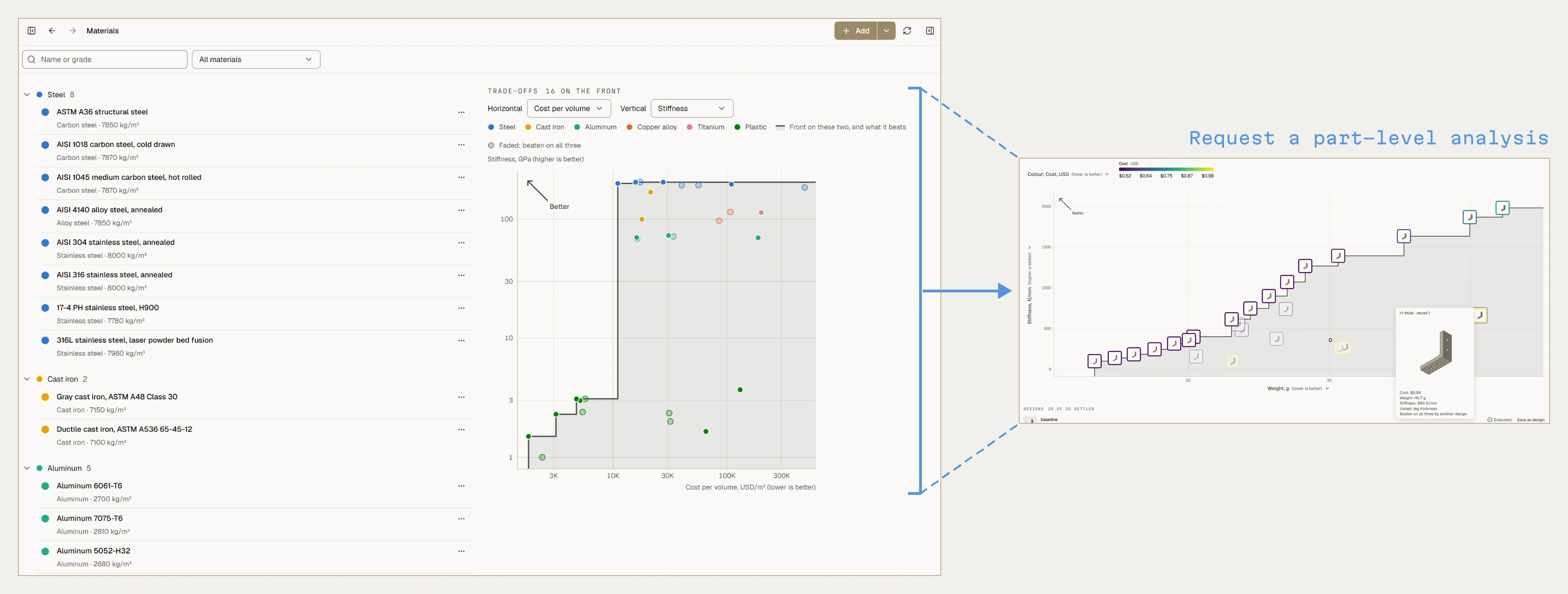
We’ll be bringing more CAD systems into Quartz, along with advanced surface modeling, simulation, CAM and manufacturability checks, and pushing to ever larger and more complex assembly handling. CAD in which agents are first-class users, at the speed and scale they need, is the opportunity. We think we’re among the best placed to build it.
Interested? You can reach us here.